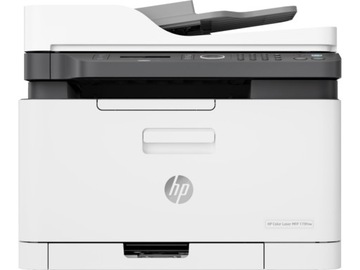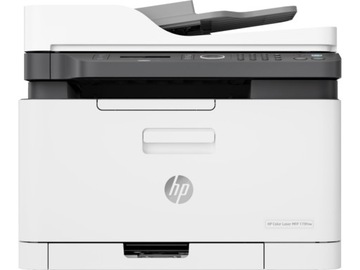

Принтер HP LASERJET PRO M404dw
В наличии
Артикул
12375972512
36 525,00 грн.

HP LASERJET PRO M404DW PRINTER
Successful business management is based on more effective work.
принтер HP LaserJet Pro M404 предназначен для роста вашего бизнеса и оставаться впереди конкурентов.
Designed with business growth in mind Reduce the amount of paper used in the office with duplex printing.1 Prints available immediately - no waiting around.
This device wakes up quickly and prints at high speed.2 наслаждайтесь беспроводной печатью, даже когда вы не подключены к сети.
Stay connected with dual-band Wi-Fi and Wi-Fi direct. 3,4,5 легко печатать с любого устройства, в любом месте, на ваш выбор HP printer-надежно через облако.6 best-in-class security that detects and Stop attacks An embedded Security suite protects the printer from being used as an entry point for attacks. 7 Protect sensitive information with optional PIN authentication / pull printing to recall print jobs. 8 Optional HP JetAdvantage Security Manager allows configuration setup. Prevent potential attacks and take immediate action with security alerts.9 простое решение для потоковой передачи вашей работы установить принтер быстро и легко управлять настройками устройств для увеличения общей эффективности печати сделать использование вашего доступного офисного пространства с принтером, который идеально подходит вашему пространству так много работы. Быстро подключитесь и начните печатать, спасибо за простую Wi-Fi сетевую настройку использования вашего смартфона. Работа без задержки и без сцепления благодаря чернилам, оснащенным технологией автоматического удаления уплотнений. Современный бизнес также является устойчивым, чтобы избежать разочарования, необходимости перепечатывать, утилизировать потребительские и сервисные потребности с оригинальными картриджами HP. Сохраните бумагу прямо из коробки.
Duplex printing is the default setting in Paper Save mode. 10 Save up-18% energy over previous products. 11 Save energy with HP Auto-on / Auto-off Technology. 12 Footnotes 1 Duplex printing is not supported on the M404n.
2measured using ISO / IEC 24734, excludes first set of test documents.
For more information, visit http://www.hp.com/go/printerclaims.
Exact Print speed will vary depending on system configuration, software application, driver, document complexity, media size, Media orientation, and media type.
The HP High Speed feature may require a Printer software update.
3 беспроводной режим работы поддерживает 2.4 ГГц and 5 ГГц frequencies.
it may also require installation of the appropriate application or software and registration of an HP ePrint account.
certain features require the purchase of optional accessories.
For more information, visit http://www.hp.com/go/mobileprinting.
4feature is supported on the HP LaserJet Pro m404dw only.
Wireless performance is dependent on physical environment and distance from the access point; may be less during active VPN connections.
5feature is supported on the HP LaserJet Pro m404dw only.
мобильное устройство должно быть подключено непосредственно к сети Wi-Fi беспроводной прямой совместимой MFP или принтеру для печати.
Depending on the mobile device, an application or driver installation may also be required.
For more information, visit http://www.hp.com/go/businessmobileprinting.
6 для включения HP Roam, некоторые устройства могут потребовать обновления прошивки и дополнительного аксессуара для добавления Bluetooth® Low Energy (BLE) alerting functionality.
May require subscription or accessories.
For more information, visit http://www.hp.com/go/roam.
7based on HP review of 2019 published security features of in-class printers.
HP offers a suite of security features that monitor to detect and automatically stop an attack then self-validate Software integrity in a reboot.
A list of printers is available at http://www.hp.com/go/PrintersThatProtect.
8 Additional solution such as HP Access Control or HP JetAdvantage Private Print is required to use optional proximity Card reader.
PIN-authentication printing is possible via the USB installed on the back of the device.
9 Instant threat notifications can appear on the device control panel when a potential threat is detected from malicious activity, or when a bug occurs or the device firmware code is at risk.
If you are concerned about this, contact your IT specialist or, if unavailable, HP Technical Support, who can verify the cause of the situation by analyzing syslog data using the standard SIEM tool from McAfee, Splunk, Arcsight, or SIEMonster.
the error message on the control panel may contain an error code in the blue screen while checking the signature in the form of code or memory write instruction.
10depends on country specific configuration specifications.
11based on HP internal testing using normalized Tec Value, 2019.
12hp Auto-On / Auto-Off Technology capabilities subject to printer and settings; may require a firmware update.
-
 БЫСТРАЯ ДОСТАВКА ПО ВСЕМ ЗАКАЗАМ
-
 ВОЗВРАТ ДЕНЕГ В ТЕЧЕНИЕ 14 ДНЕЙ
-
 БЕЗОПАСНЫЕ ПОКУПКИ